Central Processing Unit
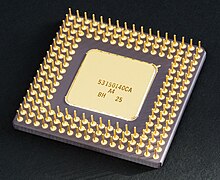

A central processing unit (CPU), also referred to as a central processor unit,[1] is the hardware within a computer that carries out the instructions of a computer program by performing the basic arithmetical, logical, and input/output operations of the system. The term has been in use in the computer industry at least since the early 1960s.[2] The form, design, and implementation of CPUs have changed over the course of their history, but their fundamental operation remains much the same.
In older computers, CPUs require one or more printed circuit boards. With the invention of the microprocessor, a CPU could be contained within a single silicon chip. The first computers to use microprocessors were personal computers and small workstations. Since the 1970s the microprocessor class of CPUs has almost completely overtaken all other CPU implementations, to the extent that even mainframe computers use one or more microprocessors. Modern microprocessors are large scale integrated circuits in packages typically less than four centimeters square, with hundreds of connecting pins.
A computer can have more than one CPU; this is called multiprocessing. Some microprocessors can contain multiple CPUs on a single chip; those microprocessors are called multi-core processors.
Two typical components of a CPU are the arithmetic logic unit (ALU), which performs arithmetic and logical operations, and the control unit (CU), which extracts instructions from memory and decodes and executes them, calling on the ALU when necessary.
Not all computational systems rely on a central processing unit. An array processor or vector processor has multiple parallel computing elements, with no one unit considered the "center". In the distributed computing model, problems are solved by a distributed interconnected set of processors.
Operation
The fundamental operation of most CPUs, regardless of the physical form they take, is to execute a sequence of stored instructions called a program. The program is represented by a series of numbers that are kept in some kind of computer memory. There are four steps that nearly all CPUs use in their operation: fetch, decode, execute, and writeback.
The first step, fetch, involves retrieving an instruction (which is represented by a number or sequence of numbers) from program memory. The location in program memory is determined by a program counter(PC), which stores a number that identifies the current position in the program. After an instruction is fetched, the PC is incremented by the length of the instruction word in terms of memory units.[7] Often, the instruction to be fetched must be retrieved from relatively slow memory, causing the CPU to stall while waiting for the instruction to be returned. This issue is largely addressed in modern processors by caches and pipeline architectures (see below).
The instruction that the CPU fetches from memory is used to determine what the CPU is to do. In the decode step, the instruction is broken up into parts that have significance to other portions of the CPU. The way in which the numerical instruction value is interpreted is defined by the CPU's instruction set architecture (ISA).[8] Often, one group of numbers in the instruction, called the opcode, indicates which operation to perform. The remaining parts of the number usually provide information required for that instruction, such as operands for an addition operation. Such operands may be given as a constant value (called an immediate value), or as a place to locate a value: a register or a memory address, as determined by some addressing mode. In older designs the portions of the CPU responsible for instruction decoding were unchangeable hardware devices. However, in more abstract and complicated CPUs and ISAs, a microprogram is often used to assist in translating instructions into various configuration signals for the CPU. This microprogram is sometimes rewritable so that it can be modified to change the way the CPU decodes instructions even after it has been manufactured.
After the fetch and decode steps, the execute step is performed. During this step, various portions of the CPU are connected so they can perform the desired operation. If, for instance, an addition operation was requested, the arithmetic logic unit (ALU) will be connected to a set of inputs and a set of outputs. The inputs provide the numbers to be added, and the outputs will contain the final sum. The ALU contains the circuitry to perform simple arithmetic and logical operations on the inputs (like addition and bitwise operations). If the addition operation produces a result too large for the CPU to handle, an arithmetic overflow flag in a flags register may also be set.
The final step, writeback, simply "writes back" the results of the execute step to some form of memory. Very often the results are written to some internal CPU register for quick access by subsequent instructions. In other cases results may be written to slower, but cheaper and larger, main memory. Some types of instructions manipulate the program counter rather than directly produce result data. These are generally called "jumps" and facilitate behavior like loops, conditional program execution (through the use of a conditional jump), and functions in programs.[9] Many instructions will also change the state of digits in a "flags" register. These flags can be used to influence how a program behaves, since they often indicate the outcome of various operations. For example, one type of "compare" instruction considers two values and sets a number in the flags register according to which one is greater. This flag could then be used by a later jump instruction to determine program flow.
After the execution of the instruction and writeback of the resulting data, the entire process repeats, with the next instruction cycle normally fetching the next-in-sequence instruction because of the incremented value in the program counter. If the completed instruction was a jump, the program counter will be modified to contain the address of the instruction that was jumped to, and program execution continues normally. In more complex CPUs than the one described here, multiple instructions can be fetched, decoded, and executed simultaneously. This section describes what is generally referred to as the "classic RISC pipeline", which in fact is quite common among the simple CPUs used in many electronic devices (often called microcontroller). It largely ignores the important role of CPU cache, and therefore the access stage of the pipeline.
Performance
Further information: Computer performance and Benchmark (computing)
The performance or speed of a processor depends on the clock rate (generally given in multiples of hertz) and the instructions per clock (IPC), which together are the factors for the instructions per second(IPS) that the CPU can perform.[20] Many reported IPS values have represented "peak" execution rates on artificial instruction sequences with few branches, whereas realistic workloads consist of a mix of instructions and applications, some of which take longer to execute than others. The performance of the memory hierarchy also greatly affects processor performance, an issue barely considered in MIPS calculations. Because of these problems, various standardized tests, often called "benchmarks" for this purpose—such as SPECint – have been developed to attempt to measure the real effective performance in commonly used applications.
Processing performance of computers is increased by using multi-core processors, which essentially is plugging two or more individual processors (called cores in this sense) into one integrated circuit.[21]Ideally, a dual core processor would be nearly twice as powerful as a single core processor. In practice, however, the performance gain is far less, only about 50%,[21] due to imperfect software algorithms and implementation. Increasing the number of cores in a processor (i.e. dual-core, quad-core, etc.) increases the workload that can be handled. This means that the processor can now handle numerous asynchronous events, interrupts, etc. which can take a toll on the CPU (Central Processing Unit) when overwhelmed. These cores can be thought of as different floors in a processing plant, with each floor handling a different task. Sometimes, these cores will handle the same tasks as cores adjacent to them if a single core is not enough to handle the information.

No comments:
Post a Comment